It’s 11 p.m., a sale just pinged your phone, and you already know tomorrow starts with a pile of busywork. Etsy order processing automation is how I’d break that cycle, and no, you don’t need to know a single line of code. Right now you’re probably answering “where’s my file?” messages before breakfast and typing order details into a spreadsheet by hand.
I’ve watched plenty of sellers burn out on tasks that a few simple tools could handle. So I’ll walk you through the workflow I’d build if I opened a digital shop today. We’ll start with the free features inside Etsy, then add tools only where they earn their place. Sound fair?
Sort Your Orders Before You Automate Anything
Here’s the mistake I see most often. Sellers jump straight into Zapier, build something clever, and then find out it doesn’t fit half their listings. Twenty minutes of sorting up front can save you a whole weekend of fixing things later.
Think of your catalog as three piles. The first pile is the plain instant download, like a printable planner, a wall art set, or a cross stitch pattern. The second is anything personalized, say a wedding invitation where the buyer types in their own names. The third gets delivered outside Etsy, usually through a link to a Canva template.
Every pile needs its own setup. So grab a coffee and spend ten minutes on this, no more. Go through your shop manager and tag each listing with the pile it belongs to. A simple note or spreadsheet works fine.
Once you’re done, you’ll probably notice that most of your catalog is the easy kind. That’s good news, because the easy kind needs the least work.
Start With Etsy’s Built-In Instant Download
Plenty of sellers don’t realize how much delivery Etsy handles on its own. When a buyer pays, the file shows up on their purchases page and they can download it right away. For plain products, that’s often all you need.
There are caps on how many files a listing can hold and how big each one can be. I won’t quote the numbers, because I can’t recall them reliably and Etsy updates them now and then. Take a quick look at the seller help pages before you plan around any limit.
Imagine you’re selling a 30-page budget planner saved as a PDF. You upload it, mark the listing as digital, and add a short “how to open this file” page at the very front. That one page answers a surprising number of questions before anyone has to ask them.
Make Your Files Easy to Open
Not everyone knows what to do with a zipped folder. If you bundle several files together, put a plain first page at the front that names the apps that work best. And name your files clearly, because “final_v3_new.pdf” confuses everyone, including you.
Cut Down Repeat Messages With Saved Replies
Most digital sellers answer the same handful of questions again and again. Where’s my file? Why won’t it open? Can I print this at home? Saved replies solve most of that.
Inside your shop manager, you’ll find a quick reply feature. Write one for thank-you notes, one for access help, and one for resending files. Keep each of them short and friendly, the way you’d talk to someone at a craft fair.
A good thank-you message does three things. It confirms the file is ready, tells the buyer where to find it, and invites them to reach out if something’s off. That’s all it needs.
You might also want to ask for reviews later. However, Etsy’s rules on automated and bulk messaging shift over time, so look them up before you set anything up. A shortcut that gets your shop flagged isn’t a shortcut.
Set Up Etsy Order Processing Automation With Zapier or Make
This is the part that actually gives you your evenings back. Zapier and Make link Etsy to your other apps, so a new order can kick off a chain of tasks while you’re asleep.
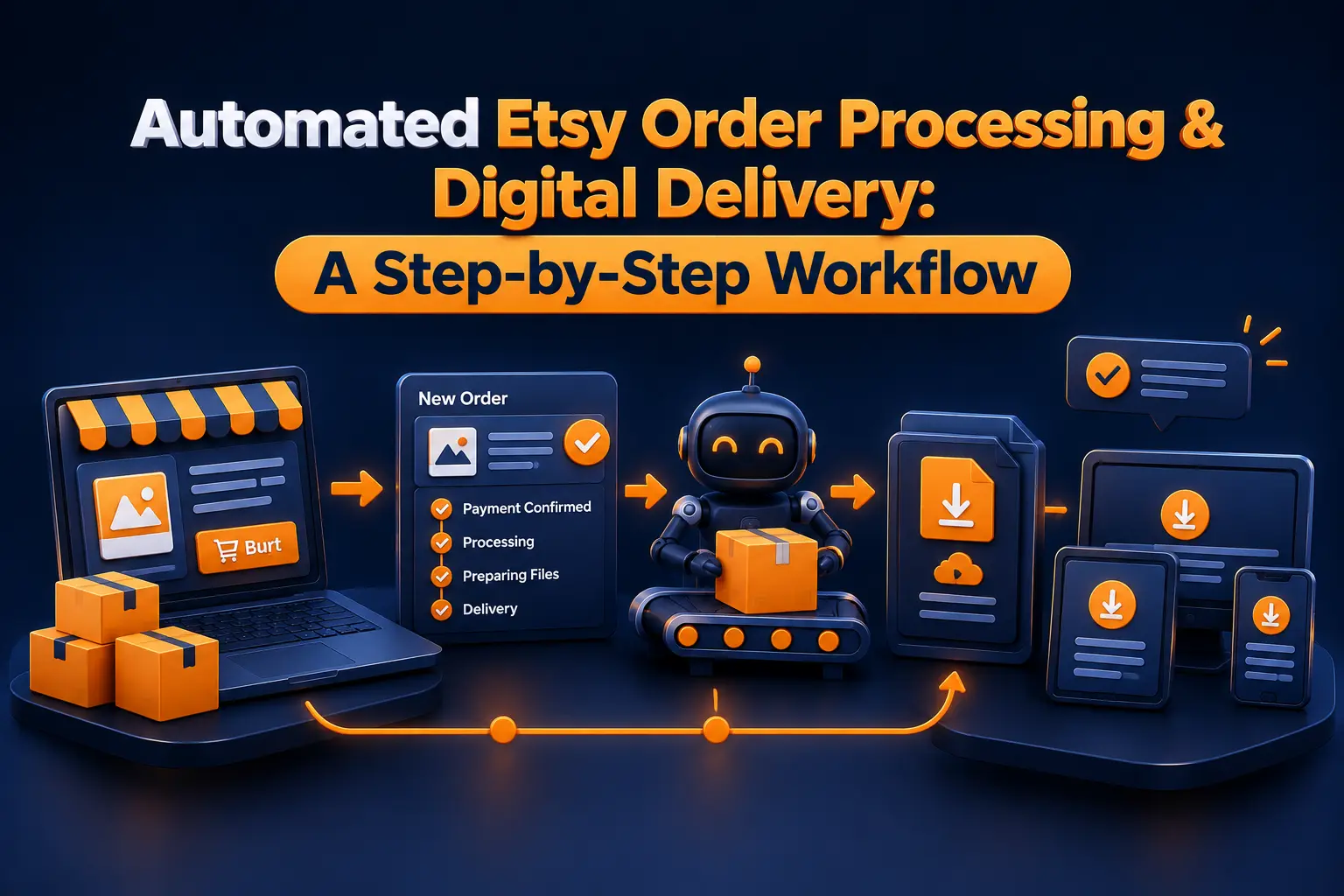
Here’s a typical setup. Each time an order arrives, a new row lands in a Google Sheet with the buyer’s name, the product, and the date. After that, you get a ping by email or Slack. If the item is personalized, the automation can also tag it, which reminds you to follow up.
Beginners often find Zapier a bit friendlier. Make usually gives you more control once your flows get complicated. Pricing and Etsy connection options change often, so I won’t quote numbers here. Try the free plans of both and see which one clicks for you.
One honest note about money. If a blogger links to these tools with affiliate links, they should say so, and I’d do the same.
A Simple Etsy Order Processing Automation Flow
Let’s say you sell 60 printables a month. Every order adds a line to your sheet, with one column for “delivered” and another for “review requested.” Give it a few weeks and patterns start to show. Maybe one listing keeps getting the same question. That’s your cue to fix the description or the file once, instead of answering the same message forever.
Deliver Personalized and Template Products the Right Way
Personalized items need more than a plain download. Buyers have to edit names, dates, colors, or wording. That’s where tools like Corjl, Templett, and Canva template links come in.
These services let buyers edit a design in their browser. They finish, hit download, and you’re out of the loop. As a result, you skip the endless proof emails.
Here’s a second scenario. Suppose you sell baby shower invitations. A buyer pays, gets an access link, types in the names and date, and downloads a print-ready PDF. Unless something breaks, you never hear from them.
Every tool has its own fees, limits, and quirks, so compare them against how many orders you actually get before you commit. And remember that Etsy has rules about delivering products off the platform. Those can change, too, so read the current guidelines first and ask Etsy support if anything’s unclear.
Put It All Together as an Etsy Digital Products Workflow
Your etsy digital products workflow is really just the same few steps, run the same way every time. Jot them down, even if it’s only a note on your phone. A process you can see on a screen is much easier to fix than one stuck in your head.
For me, it would go something like this: the order comes in, the file delivers, the thank-you goes out, the spreadsheet updates, and a review reminder follows a few days later. After that hums along for a while, you can start adding extras like seasonal sales or bundle offers.
This is also why so many people search for passive income etsy digital products. A solid system gets you closer, since you stop trading hours for every single sale. Still, passive isn’t the same as zero effort. You’ll answer questions, update files, and fix the odd broken link.
When you’re ready, etsy order fulfillment automation for personalized items is the natural next layer. For now, keep your first version simple. It’ll have gaps, and that’s fine. Fix them one at a time.
Plan for Things That Go Wrong
Even good etsy order processing automation breaks sometimes. Downloads fail. Buyers ask for refunds. Links die. So plan for the bad days before they show up.
Start by keeping a backup of every product file in cloud storage. Next, write a saved reply for resending files. Then decide your refund approach now, and match it to Etsy’s policies for digital items.
Last, run a test. Ask a friend to place an order, or walk through each step yourself the way a buyer would. If a step confuses you, it’ll confuse your customers even more.
Your Next Step
You don’t have to automate it all this week. Take your best seller, write a clear access message for it, and start a Google Sheet that logs each order. One evening, tops.
After that feels easy, connect Zapier or Make and let etsy order processing automation handle the repetitive parts. Then move through your listings one at a time. By next month, you’ll wonder how you ever managed it by hand.
So which listing are you starting with tonight?